- What Execution Logs Are
- How Execution Logs Differ from Usage Logs
- Where Execution Logs Are Available
- What Execution Logs Capture
- Execution Logs and Provider Fallbacks
- Execution Logs in OmniBlocks and Workflows
- Execution Logs and Chatbots
- Execution Logs and Limits
- Error Diagnosis with Execution Logs
- What Execution Logs Do Not Show
- Who Should Use Execution Logs
- Common Mistakes
- Best Practices
- Summary
Execution Logs in Aimogen are the deep technical trace of how AI actions are executed internally. While Usage Logs answer what happened and who triggered it, Execution Logs answer how it happened, step by step. They are designed for debugging, validation, and troubleshooting, not for cost tracking or analytics.
If something behaves unexpectedly, Execution Logs are where you look.
What Execution Logs Are #
Execution Logs record the internal execution flow of Aimogen features, including:
- how a request was constructed
- which execution path was chosen
- which providers and models were evaluated
- how fallbacks were handled
- which internal steps succeeded or failed
- where execution stopped
They reflect the mechanics of execution, not just the outcome.
How Execution Logs Differ from Usage Logs #
This distinction is important.
- Usage Logs → high-level audit (what ran, who ran it, cost-related context)
- Execution Logs → low-level trace (how Aimogen executed the task internally)
Usage Logs are operational.
Execution Logs are diagnostic.
Where Execution Logs Are Available #
Execution Logs are available in the Aimogen admin area.
Path:
Aimogen → ‘Logs & Translations’ menu -> ‘Activity Logs’ tab:
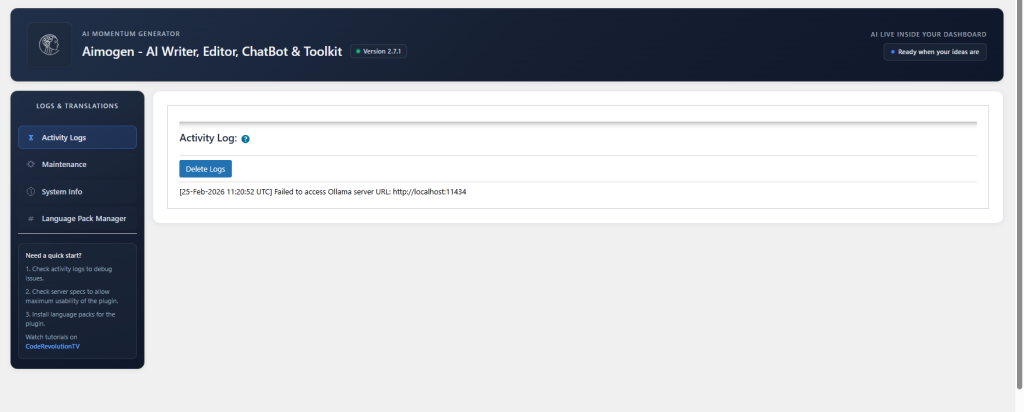
They are read-only and intended for inspection only.
What Execution Logs Capture #
Depending on the feature, execution logs may include:
- execution start and end markers
- selected feature path (generator, chatbot, editor, workflow, etc.)
- provider resolution process
- model selection logic
- fallback evaluation
- prompt assembly stages
- embeddings retrieval steps
- assistant resolution
- internal validation checks
- error or interruption points
They show the decision chain, not just the final call.
Execution Logs and Provider Fallbacks #
Execution Logs are especially important when provider fallback is enabled.
They allow you to see:
- which provider was attempted first
- why it failed or was skipped
- whether limits blocked execution
- which fallback provider was used
- where execution finally succeeded or stopped
Without execution logs, fallback behavior is opaque.
Execution Logs in OmniBlocks and Workflows #
For OmniBlocks and complex workflows, Execution Logs are critical.
They show:
- which blocks executed
- data passed between steps
- which step failed
- whether execution short-circuited
- whether conditional logic was applied
This is the only reliable way to debug multi-step AI pipelines.
Execution Logs and Chatbots #
For chatbots, execution logs help diagnose:
- why a chatbot did not respond
- why embeddings were not used
- why an assistant was ignored
- why a message was blocked
- why a conversation terminated early
They expose logic issues that are invisible at the UI level.
Execution Logs and Limits #
Execution Logs reveal why a request was blocked.
They distinguish between:
- global limit reached
- role-based limit reached
- feature-specific limit reached
- provider disabled
- model restricted
- configuration missing
This prevents guessing and misconfiguration loops.
Error Diagnosis with Execution Logs #
Execution Logs are the primary tool for diagnosing:
- silent failures
- unexpected behavior
- incomplete execution
- partial workflow runs
- provider misconfiguration
- invalid internal state
They show where execution stopped, not just that it stopped.
What Execution Logs Do Not Show #
Execution Logs do not:
- store full generated content
- expose API keys
- leak sensitive user data
- replace provider-side logs
- act as performance benchmarks
They are focused on internal logic, not payload storage.
Who Should Use Execution Logs #
Execution Logs are most useful for:
- site administrators
- developers
- advanced users
- support diagnostics
- complex automation setups
Casual users typically do not need them.
Common Mistakes #
- checking Usage Logs when debugging execution logic
- ignoring Execution Logs during workflow failures
- assuming provider errors without checking logs
- misinterpreting blocked execution as provider downtime
- not sharing execution logs when requesting support
Most “mystery bugs” are visible in execution logs immediately.
Best Practices #
Use Execution Logs whenever behavior does not match expectations. Pair them with Usage Logs for full context. When troubleshooting, identify the exact step where execution diverged. Treat execution logs as your internal trace, not as noise.
Summary #
Execution Logs in Aimogen provide a step-by-step trace of internal AI execution, showing how requests were built, routed, validated, and executed. They are the primary tool for debugging complex behavior, provider fallback logic, workflows, and limit enforcement. If Usage Logs tell you what happened, Execution Logs tell you why.


