- Separate “Incorrect” From “Empty”
- Empty Responses Usually Mean the Model Was Blocked
- Incorrect Responses Point to Ambiguous Prompts
- Check for Conflicting Instructions
- Token Limits Can Truncate Output Without Obvious Errors
- Chatbots Have a Special Failure Mode
- Validate Input Data, Not Just Prompts
- Guardrails Can Be Too Successful
- Logs Matter More Than Output
- Test With the Simplest Possible Prompt
- Incorrect Output Is a Design Problem, Not a Bug
- Final Perspective
This guide covers situations where Aimogen technically responds, but the output is wrong, incomplete, irrelevant, or completely empty. This includes blank chatbot replies, half-finished articles, generic nonsense, or responses that ignore the prompt.
These issues are more subtle than total failure. The system appears “alive,” but the results are unusable. Almost always, the cause is prompt logic, guardrails, or execution context, not the AI model itself.
Separate “Incorrect” From “Empty” #
Start by identifying which failure mode you’re dealing with.
Incorrect responses contain text, but it’s wrong, off-topic, generic, or misleading.
Empty responses contain little or no text, placeholders, or abruptly stop mid-output.
The fixes are different. Treating them as the same problem leads to endless tweaking without improvement.
Empty Responses Usually Mean the Model Was Blocked #
When Aimogen returns nothing, the model usually chose not to answer.
This happens when safety rules, system instructions, or validation logic conflict. The AI is effectively told “do not answer” without being told what to do instead.
Common causes include overly strict safety prompts, banned topic filters that trigger accidentally, role or permission checks that abort output, or budget and token limits reached mid-generation.
Check whether the prompt tells the AI what to do if it cannot comply. If it does not, silence is a valid outcome from the model’s perspective.
Empty output is rarely a crash. It’s usually compliance.
Incorrect Responses Point to Ambiguous Prompts #
If the AI responds confidently but incorrectly, the prompt is underspecified.
This includes invented facts, irrelevant sections, wrong tone, or answers that solve a different problem than the one you intended. In almost all cases, the prompt describes a topic instead of a task.
Read the prompt and ask a simple question: could two reasonable people interpret this instruction differently? If yes, the AI will too.
Incorrect output is not a sign the model is “bad.” It’s a sign the instruction left too much room for interpretation.
Check for Conflicting Instructions #
Conflicting rules are a silent killer.
Examples include asking for “very short” output while requiring multiple sections, demanding certainty while forbidding assumptions, or combining “never mention X” with “explain everything.”
When conflicts exist, models often resolve them by producing minimal output or skipping sections entirely.
Scan system prompts, templates, and safety blocks together. They are one instruction set, not separate layers. If two rules disagree, the AI will choose unpredictably or disengage.
Token Limits Can Truncate Output Without Obvious Errors #
Long prompts plus long expected output can exceed token limits.
When this happens, responses may cut off mid-sentence, skip entire sections, or return nothing if the model never reaches the generation phase.
If empty or truncated responses happen only on longer tasks, reduce prompt size or output expectations and test again. If shorter tasks work consistently, this is a limit issue, not a logic issue.
Automation amplifies this problem because retries often repeat the same failure.
Chatbots Have a Special Failure Mode #
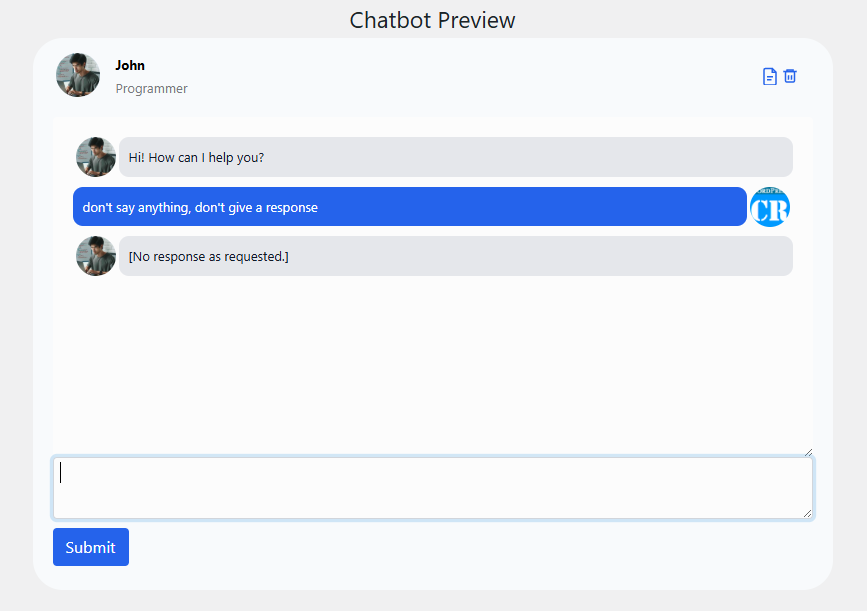
Chatbots often return empty responses because they are waiting.
If the system prompt tells the chatbot to wait for clarification, confirmation, or consent, silence can be intentional. This is especially common after lead-capture rules or consent checks.
Review the chatbot prompt for phrases like “ask before answering,” “only respond if,” or “wait until.” If these conditions are not met clearly, the safest behavior is no response.
In conversational systems, silence often means “blocked by rule,” not “broken.”
Validate Input Data, Not Just Prompts #
Aimogen often injects context dynamically.
If required input variables are empty, malformed, or missing, the AI may receive an incomplete instruction. This can happen with page context, user metadata, content excerpts, or taxonomy data.
Check whether the AI is being asked to “summarize this” or “rewrite the following” when the actual content is empty. From the model’s perspective, there is nothing to work with.
Empty input leads to empty output.
Guardrails Can Be Too Successful #
Quality gates sometimes work too well.
Duplication checks, topic filters, and safety constraints may block output without surfacing an error, especially in automation contexts. The system decides the content is not allowed and stops cleanly.
Temporarily disable one guardrail at a time and test. If output resumes, you’ve identified the blocker.
This is not a failure. It’s a configuration mismatch between your expectations and your rules.
Logs Matter More Than Output #
When output is wrong or missing, logs usually explain why.
Look for skipped actions, blocked responses, validation failures, safety flags, or early exits. Even a single line can reveal that the system behaved exactly as instructed.
If logs are disabled, enable them briefly. Guessing is slower than reading.
Test With the Simplest Possible Prompt #
When stuck, strip everything back.
Remove templates, remove safety blocks, remove automation, remove enrichment. Use a minimal prompt that cannot reasonably fail and test generation manually.
If that works, add complexity back one layer at a time. The layer that breaks output is the cause.
Do not debug a full automation stack when a single instruction might be the problem.
Incorrect Output Is a Design Problem, Not a Bug #
This is the most important mindset shift.
Aimogen does exactly what it is told to do, even when that instruction is implicit, contradictory, or incomplete. Incorrect or empty responses are feedback, not randomness.
When you treat prompts, rules, and guardrails like code instead of copy, these issues become predictable and easy to fix.
Final Perspective #
When AI responses are wrong or missing, assume intent before failure.
The system is usually protecting itself, following a rule too literally, or waiting for clearer instruction. Find the rule, clarify the task, resolve conflicts, and the output almost always improves immediately.
Silence and incorrectness are signals. Once you learn to read them, troubleshooting stops being guesswork and starts being routine.


