- Understand What Aimogen Actually Counts
- Limits Are Usually Evaluated Earlier Than You Expect
- Multiple Limits Can Stack Quietly
- Retries Inflate Usage Faster Than Expected
- Chatbots Consume Budget Continuously
- Maintenance and Background Jobs Are Easy to Forget
- Time Windows Matter More Than Totals
- Role-Based Limits Can Surprise Administrators
- Logs Usually Explain the Trigger
- How to Confirm It’s Really a Limit Issue
- Final Diagnosis Mindset
This guide addresses cases where Aimogen stops generating, pauses automation, or blocks actions because a limit is reached even though usage appears low. These situations feel unpredictable, but they are almost always the result of how limits are defined, measured, or combined across the system.
When limits trigger “too early,” it’s rarely a bug. It’s usually a misunderstanding of what is being counted and when.
Understand What Aimogen Actually Counts #
The first mistake is assuming limits are based only on visible actions.
Aimogen limits often count API calls, tokens, retries, background jobs, chatbot messages, image generations, and maintenance runs. A single visible action can trigger multiple invisible requests.
For example, generating one post may include outline creation, body generation, metadata generation, internal link analysis, image generation, and validation retries. From a user perspective, that feels like “one action.” From the system’s perspective, it may be ten.
If you only count published posts, you are underestimating usage.
Limits Are Usually Evaluated Earlier Than You Expect #
Many limits are checked before execution, not after.
If Aimogen estimates that a task could exceed a limit, it may block the task entirely rather than risk partial execution. This is intentional. Failing early is safer than stopping halfway through.
That means a task can be blocked even if the current usage is slightly below the limit. The system is reserving capacity, not reacting to history.
This behavior often looks like a false positive, but it’s a preventative decision.
Multiple Limits Can Stack Quietly #
Aimogen often enforces more than one limit at the same time.
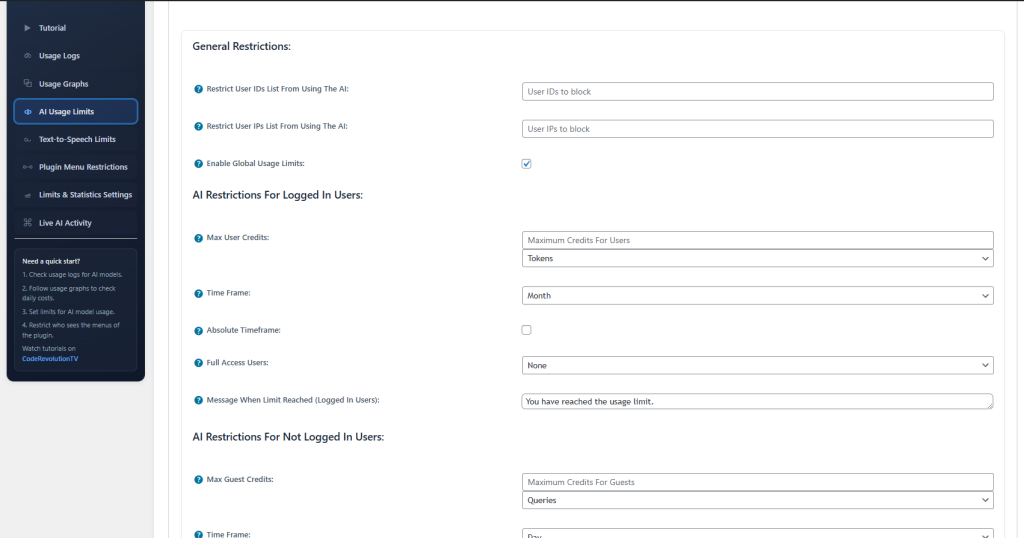
You may have a global monthly budget, a daily cap, a per-role limit, and a per-feature limit all active simultaneously. Hitting any one of them is enough to stop generation.
When limits overlap, the smallest one wins. If you forget a low per-role or per-day limit exists, it will appear as if the main budget is being ignored.
Unexpected triggering is often just the wrong limit being reached first.
Retries Inflate Usage Faster Than Expected #
Retries are a common hidden multiplier.
If Aimogen retries failed requests due to timeouts, validation failures, or temporary API errors, each retry counts toward limits. A single failing task can consume several units of budget without producing output.
This is why limits sometimes trigger during “nothing happening” periods. The system is trying and failing repeatedly in the background.
If limits trigger while output is empty, look for retry loops before assuming incorrect accounting.
Chatbots Consume Budget Continuously #
Chatbots feel lightweight, but they run often.
Every chatbot interaction is an API call, sometimes multiple calls per message. On high-traffic sites, chatbot usage can exceed content generation costs quickly, especially if responses are long or prompts are heavy.
If limits trigger during normal site usage rather than publishing, the chatbot is often the reason.
Chatbots also run at unpredictable times, which makes limit exhaustion feel random.
Maintenance and Background Jobs Are Easy to Forget #
Automated refresh, analysis, and cleanup tasks consume budget even though they don’t create visible content.
If Aimogen is configured to revisit old posts, update metadata, or analyze performance regularly, those jobs count. They often run on schedules that don’t align with your expectations.
Limits triggering overnight or during low-traffic periods are often caused by background maintenance, not user activity.
Time Windows Matter More Than Totals #
Daily and hourly limits are stricter than monthly ones.
You may have plenty of monthly budget left, but a short burst of activity can still hit a daily or hourly cap. Automation that runs in batches is especially prone to this.
From the outside, it looks like the system stopped early. Internally, it simply hit a short-term ceiling.
Spreading work out often fixes the problem without changing the total budget.
Role-Based Limits Can Surprise Administrators #
Role limits sometimes apply even to administrators.
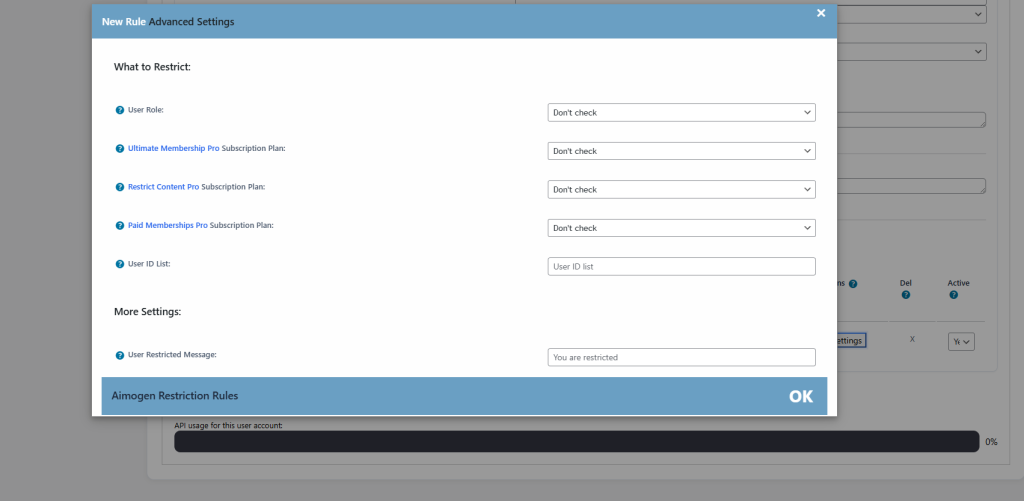
If Aimogen treats roles uniformly or applies limits based on execution context rather than logged-in user, admin-triggered automation can still hit the same caps as author-triggered actions.
This is especially confusing when testing manually. You expect admin actions to bypass limits, but the system is behaving consistently.
Check whether limits are tied to roles, features, or execution type, not just user level.
Logs Usually Explain the Trigger #
When a limit triggers, Aimogen almost always knows which one.
Logs often record whether the block was due to budget, rate, quota, or safety thresholds. Even a short message can tell you exactly which rule fired.
If you don’t look at logs, every limit feels arbitrary. If you do, they become predictable.
How to Confirm It’s Really a Limit Issue #
The fastest confirmation method is to temporarily raise or disable one limit and test again.
If the action immediately succeeds, the system was behaving correctly. If it still fails, the problem lies elsewhere.
Do this briefly and deliberately. Limits exist for a reason, but testing with them relaxed is the quickest way to identify the cause.
Final Diagnosis Mindset #
Limits triggering unexpectedly is a perception problem more than a system problem.
Aimogen counts more things than users intuitively expect, evaluates limits conservatively, and stacks multiple safeguards at once. That makes the system safe, but sometimes confusing.
Once you understand what is counted, when it is counted, and which limit is smallest, the behavior stops feeling random and starts feeling strict but logical.
Limits are not there to stop you. They are there to keep automation predictable. When they fire, they are telling you something about how your system is actually being used.


