- Minimum System Requirements
- Recommended Server Settings (Strongly Advised)
- Cron & Background Processing
- Hosting Environment Recommendations
- Object Cache & Performance
- Multisite Considerations
- API Connectivity Requirements
- Browser Requirements (Admin & Frontend)
- Common Symptoms of Insufficient Server Resources
- Quick Checklist
Aimogen is a resource-intensive plugin by design. It performs real-time API communication, bulk processing, background execution, media handling, and optional voice and vision workflows. While it can run on standard WordPress hosting, reliable performance — especially for bulk jobs, chatbots, and workflows — depends heavily on server configuration.
This document explains both minimum system requirements and recommended server settings, along with the reasoning behind each value.
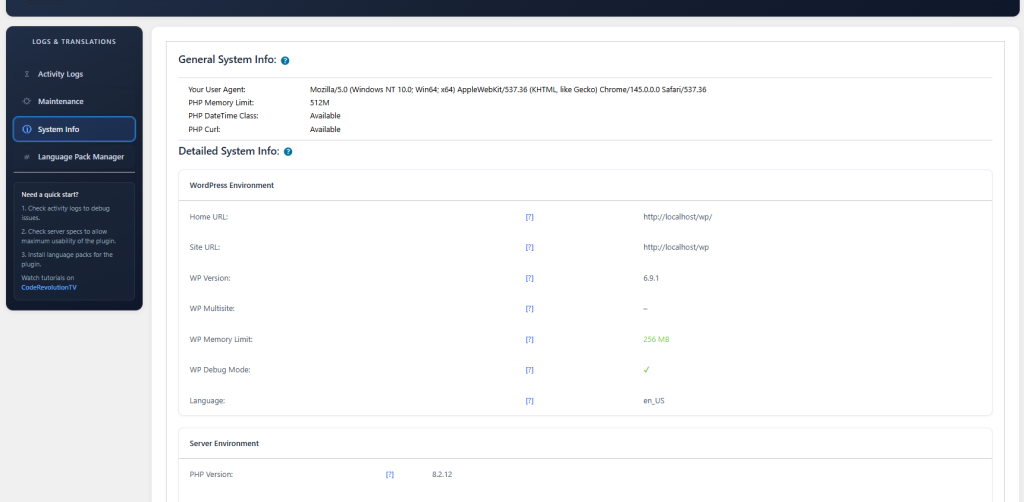
Check details in the plugin’s menu -> ‘Logs & Translations’ menu -> ‘System Info’ tab.
Minimum System Requirements #
These are the lowest settings under which Aimogen can function correctly for light usage such as single post generation, manual editing, or basic chatbot usage.
WordPress
Aimogen requires a modern WordPress environment.
Minimum supported WordPress version: 6.0
Recommended WordPress version: latest stable
PHP
Aimogen executes long-running API calls and background operations.
Minimum PHP version: 7.0
Recommended PHP version: 7.4 or newer
Database
MySQL 5.7+ or MariaDB 10.4+
HTTPS
HTTPS is required for:
- API communication
- Voice features
- Browser-based chatbot interaction
- Secure credential storage
Without HTTPS, several features will not function correctly.
Recommended Server Settings (Strongly Advised) #
These values are recommended for production use, bulk generation, chatbots, OmniBlocks, and AI workflows.
PHP Memory LimitWP_MEMORY_LIMIT >= 128MWP_MAX_MEMORY_LIMIT >= 256M
Why this matters:
AI responses, logs, embeddings, images, and workflow metadata are handled in memory. Low memory limits cause silent failures, partial responses, or editor issues.
PHP Time Limitmax_execution_time >= 1000
Why this matters:
Bulk content generation, CSV imports, RSS processing, and OmniBlock workflows can exceed standard execution limits. Short limits will interrupt jobs mid-run.
PHP Input Variablesmax_input_vars >= 5000
Why this matters:
Complex admin pages, workflow builders, chatbot configuration screens, and large forms rely on high input limits.
Upload Limitsupload_max_filesize >= 64Mpost_max_size >= 64M
Why this matters:
Used for:
- Embeddings file uploads (CSV, TXT, PDF, DOCX)
- Media generation
- Assistant file uploads
- Workflow data ingestion
Cron & Background Processing #
Aimogen relies on WordPress cron for scheduled jobs, rule execution, and delayed processing.
Recommended:
- A real system cron job triggering
wp-cron.php - Disable pseudo-cron if possible (
DISABLE_WP_CRON)
Why this matters:
Scheduled content generation, RSS automation, and background workflows are unreliable on low-traffic sites without real cron execution.
Hosting Environment Recommendations #
Aimogen works best on:
- VPS hosting
- Managed WordPress hosting with sufficient resources
- Cloud instances (AWS, GCP, Hetzner, etc.)
Shared hosting may work for:
- Single post generation
- Manual editing
- Light chatbot usage
Shared hosting often struggles with:
- Bulk generation
- OmniBlocks
- Voice and real-time chat
- Image generation
- Long workflows
Object Cache & Performance #
Object caching is optional but recommended.
Supported:
- Redis
- Memcached
Benefits:
- Faster admin UI
- Reduced database load
- Better chatbot performance
- Improved workflow stability
Avoid aggressive full-page caching on admin pages or chatbot endpoints unless exclusions are configured.
Multisite Considerations #
Aimogen supports WordPress multisite, but requires:
- Higher memory limits
- Increased execution time
- Careful API limit management per site
Bulk operations across multiple sites should be staggered to avoid API throttling.
API Connectivity Requirements #
Your server must allow outbound HTTPS connections on port 443.
The following must not be blocked:
- cURL requests
- REST API calls
- Streaming responses (for realtime chat)
Firewalls or security plugins that block outbound requests can prevent AI providers from responding.
Browser Requirements (Admin & Frontend) #
For full functionality, modern browsers are required.
Recommended:
- Latest Chrome
- Latest Firefox
- Latest Edge
Older browsers may not support:
- Streaming responses
- Voice input/output
- Vision features
- Real-time chat UI
Common Symptoms of Insufficient Server Resources #
If your server does not meet the recommended requirements, you may experience:
- AI jobs stopping mid-execution
- Empty or partial AI responses
- Bulk generators freezing
- Chatbots not responding
- Images not attaching to posts
- Admin pages failing to save settings
Most of these issues are resolved by increasing memory and execution time.
Quick Checklist #
Before running Aimogen in production, confirm:
- PHP 7.0+
- WP memory limit ≥ 128M
- PHP time limit ≥ 1000
- HTTPS enabled
- Outbound HTTPS requests allowed
- Real cron configured
- Adequate disk space for logs and embeddings
Aimogen is designed to scale with your needs. The more advanced the workflows you use, the more important proper server configuration becomes. Setting these values early prevents issues later and ensures consistent, predictable AI behavior across your site.


