- Understand What “Translation” Means in Aimogen
- Translating the Aimogen Plugin Interface
- Translating Aimogen Admin Notices and Dynamic Strings
- Set the Language for AI-Generated Content Explicitly
- Translate Templates, Not Just Output
- Handling Multilingual Sites Correctly
- Translating Chatbots and Conversational AI
- Avoid Mixing Languages in Automation
- Testing Before Going Live
- Final Notes
This guide explains how to translate Aimogen into any language, both for the admin interface and for AI-generated output. The goal is full localization, not just surface-level translation. When done correctly, Aimogen behaves like a native plugin in the target language and produces content that sounds written for that audience, not translated for them.
The guide assumes Aimogen is already installed and working in its default language.
Understand What “Translation” Means in Aimogen #
Aimogen has two separate language layers that must be handled independently.
The first layer is the plugin interface. This includes menus, buttons, settings labels, notices, and help text inside WordPress. This layer behaves like any other WordPress plugin and is translated using standard localization methods.
The second layer is AI behavior. This includes generated content, chatbot conversations, system prompts, templates, automation output, and any text the model produces. This layer is not translated automatically unless you explicitly design it that way.
Most failed translations happen because only one layer is handled.
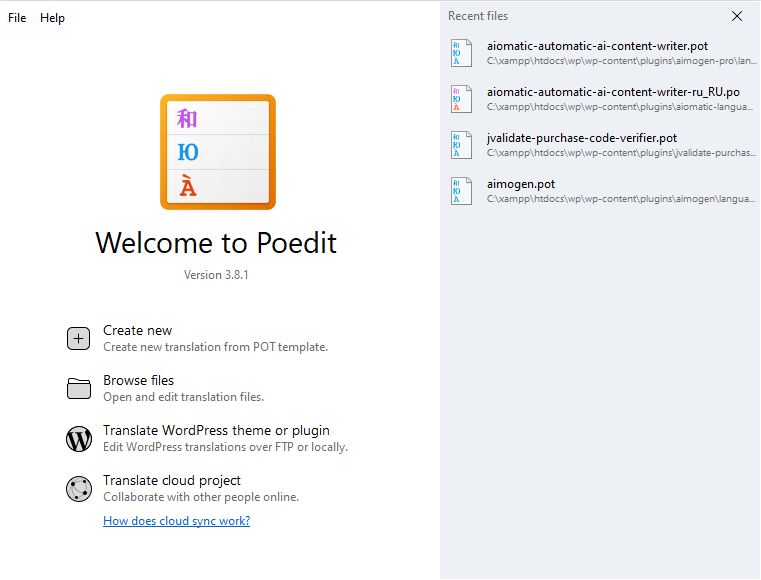
To translate the plugin, look for the aiomatic-automatic-ai-content-writer.pot file, in the \aimogen-pro\languages folder. You can load it in a program like Poedit, where you will also able to create the needed translation files (.po and .mo).
Translating the Aimogen Plugin Interface #
Aimogen follows WordPress internationalization conventions. If the plugin is properly prepared for translation, all interface strings are wrapped in translation functions and can be localized without touching code logic.
The cleanest approach is to use a WordPress translation workflow. Install your preferred translation tool or use a multilingual plugin that supports plugin string translation. Locate Aimogen in the plugin translation section and create a language file for your target locale.
Translate only interface text. Do not translate option keys, internal identifiers, hooks, or capability names. Those must remain unchanged for the plugin to function correctly.
After saving translations, switch your WordPress site language or user language to the target locale and verify that Aimogen menus and settings appear correctly. If some strings remain untranslated, they are likely hardcoded or dynamically generated and should be reported or handled manually.
Translating Aimogen Admin Notices and Dynamic Strings #
Some Aimogen text may be generated dynamically based on context, such as status messages, logs, or validation feedback.
If these strings are exposed through WordPress localization, they will appear in translation tools. If not, you should treat them as fixed technical output and leave them in the original language, or override them via filters if Aimogen provides them.
Do not attempt to translate log messages that are meant for debugging unless you fully control the environment. Mixed-language logs are inconvenient, but broken logs are worse.
Set the Language for AI-Generated Content Explicitly #
AI models do not automatically follow the site language unless instructed.
To translate generated content, you must tell Aimogen which language to use and how to use it. This is done in system prompts, templates, and chatbot instructions.
The most reliable approach is to state the language requirement clearly and unambiguously in the system prompt. Avoid vague phrasing. Do not rely on inference.
A strong instruction defines the language, the regional variant if relevant, and expectations about tone and idioms. This ensures the AI writes natively rather than translating English patterns word-for-word.
If your site supports multiple languages, create separate Aimogen configurations per language instead of trying to switch languages dynamically inside a single prompt. Language-specific setups are more predictable and easier to debug.
Translate Templates, Not Just Output #
Templates are part of the language layer.
If you reuse English templates and simply tell the AI to “write in Spanish” or “write in German,” the structure, pacing, and rhetorical style will often remain English. This produces content that feels foreign even if the words are correct.
For high-quality results, translate and adapt templates themselves. Headings, section flow, and even what is considered polite or authoritative vary by language.
Aimogen performs best when templates are written by someone fluent in the target language, even if they are simpler than the original.
Handling Multilingual Sites Correctly #
If your site is multilingual, each language should be treated as a separate content system.
Each language needs its own Aimogen campaign or equivalent configuration, its own prompts, its own templates, and its own automation rules. Shared automation across languages almost always causes subtle quality issues.
If you use a multilingual plugin, ensure Aimogen generates content in the correct language context and assigns it to the correct language version of the post. Do not generate content first and translate it afterward unless you accept lower quality.
Native generation always outperforms post-generation translation.
Translating Chatbots and Conversational AI #
Chatbots require special attention because they operate in real time.
Define the chatbot’s language in its system prompt and opening message. If your site switches language based on user selection, the chatbot must follow that same signal.
Avoid automatic language detection unless you have tested it extensively. Detection errors are jarring in conversations. It is usually better to follow the site language or ask the user once and remember the choice.
All lead capture messages, consent text, and confirmations must be translated manually and reviewed carefully. Legal meaning does not survive casual translation.
Avoid Mixing Languages in Automation #
One of the most common mistakes is partial translation.
A translated interface with English AI output looks broken. Native AI output with English admin notices confuses editors. Mixed languages inside the same post destroy credibility.
Aimogen automation should run in exactly one language per workflow. If you need multiple languages, duplicate the workflow.
Consistency matters more than coverage.
Testing Before Going Live #
After translation, test Aimogen as if you were a native user.
Navigate the admin interface in the target language and confirm that settings make sense linguistically, not just technically. Generate content and read it as content, not as output. Run the chatbot and check that tone, formality, and phrasing feel natural.
If something feels “translated,” it probably is. Fix it at the prompt or template level, not by post-editing output.
Final Notes #
Translating Aimogen is not a single action. It is a combination of proper WordPress localization and intentional AI language design.
When both layers are handled correctly, Aimogen disappears into the background and behaves like a native tool for your language and market. When either layer is neglected, the system feels foreign and unreliable.
Treat language as infrastructure, not decoration, and Aimogen will scale cleanly into any market you choose.


