Uninstalling Aimogen is designed to be explicit and user-controlled, not implicit or destructive by default. The plugin never assumes that deactivation means data loss. Instead, you are always asked to decide what should happen to your data.
This makes uninstalling safe on production sites and predictable on staging or development environments.
When you deactivate Aimogen, WordPress will display a prompt asking whether you want to keep or remove plugin data. This prompt is the most important part of the uninstall process. Nothing is deleted automatically unless you explicitly confirm it.
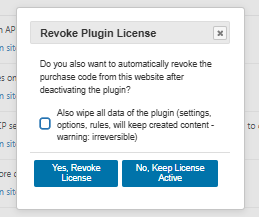
If you choose to keep settings, Aimogen will be deactivated but all data remains intact. This includes plugin configuration, API settings, usage limits, chatbots, workflows, schedules, embeddings configuration, and internal metadata. In this mode, deactivation behaves like a pause. If you later reinstall or reactivate Aimogen, everything resumes exactly where it left off. This option is recommended when troubleshooting, testing updates, or temporarily disabling AI features.
If you choose to remove settings, Aimogen performs a full cleanup. All plugin-related configuration is deleted. This includes stored options, custom plugin data, internal tables created by Aimogen, scheduled rules, chatbots, workflows, limits, logs, embeddings metadata, and all internal execution state. After this process, the site has no Aimogen footprint left behind.
This deletion is permanent. Once confirmed, it cannot be undone unless you restore a backup.
Generated content is not removed in either case. Posts, pages, products, reviews, and any other content created or edited by Aimogen remain normal WordPress content. This is intentional. Aimogen never deletes user content automatically, even during full uninstall. Editorial data always belongs to WordPress, not to the plugin.
Usage Logs and Execution Logs are also treated as plugin data. If you choose full removal, these logs are deleted. If you keep settings, logs remain available when the plugin is reactivated.
API keys are handled as part of plugin settings. If you remove settings, all stored API keys are erased. If you keep settings, keys remain stored exactly as before.
Scheduled automation deserves special mention. If you fully uninstall Aimogen, all scheduled rules and background tasks are removed. There are no orphaned cron jobs left behind. If you keep settings and only deactivate, schedules are paused automatically and resume only when the plugin is reactivated.
Embeddings follow the same logic. Configuration and stored embeddings metadata are removed only when you explicitly choose full cleanup. If settings are kept, embeddings remain available.
From a maintenance perspective, the recommended approach depends on intent. For temporary deactivation, debugging, updates, or licensing changes, keeping settings is the correct choice. For permanent removal, site handover, or complete reset, full removal is appropriate.
There is no need to manually delete database tables, options, or files. Aimogen handles cleanup internally when you confirm removal. Manual deletion is discouraged, as it can leave partial state behind or break other integrations.
As with any destructive operation, a full backup is strongly recommended before choosing complete removal, especially on production sites. While Aimogen’s uninstall process is deterministic, backups are your safety net.
In short, uninstalling Aimogen is deliberate by design. You decide whether the plugin leaves a trace or not. Deactivation alone never destroys data. Full cleanup only happens when you explicitly approve it. This keeps both experimentation and permanent removal safe, predictable, and reversible when needed.


